
Oracle Cloud ERP.
Meet the command line.
Your SQL. Your data. Your machine.
And an AI that asks Oracle for you.
Free for 30 days.
No card. Nothing to cancel. It just stops.
# Real SQL. No data model.
java -jar .\fusion-cli-toolkit.jar sql-query `
        --queryFile=".\open-invoices.sql" `
        --outputFile=".\open-invoices.csv"

# Same command. In cron. With an exit code.
java -jar .\fusion-cli-toolkit.jar submit-ess-job `
        --jobPackageName="/oracle/apps/ess/financials/payables/invoices/transactions/" `
        --jobDefinitionName="APXIIMPT"
Why Fusion Toolkit?
The cloud took your tools.
Take them back.
Choose a capability
SQL → CSV
Write SQL. Get a complete CSV.
fusion-toolkit sql-query -q "SQL/open-invoices.sql" -o "output/open-invoices.csv"Sanitized example result
Reading SQL query file: SQL/open-invoices.sqlExecuting query...Result: 12 data rows, 4 columnsQuery execution complete. Output saved to: output/open-invoices.csvESS job control
Submit it. Watch it finish.
fusion-toolkit submit-ess-job -p "/oracle/apps/ess/financials/payables/invoices/transactions/" -j "APXIIMPT" --poll-interval 10 --max-wait 1800Sanitized example result
Submitting ESS Job: APXIIMPTESS Job submitted successfully. Request ID: 1048721ESS Job 1048721 status: RUNNINGESS Job 1048721 status: SUCCEEDEDESS Job 1048721 completed successfully.BI Publisher report
Run the report your workflow needs.
fusion-toolkit bi-publisher-run-report -p "/Custom/Finance Reports/AP Aging Report.xdo" -f csv -o "output/ap-aging.csv"Sanitized example result
Running BI Publisher report: /Custom/Finance Reports/AP Aging Report.xdoDecoded report size: 18432 bytesReport run successfully. File saved to: output/ap-aging.csvBI Publisher catalogue transfer
Move a complete folder between pods.
fusion-toolkit --profile source bi-publisher-download -p "/Custom/Finance Reports/" -o "output/finance-reports.catalog"
fusion-toolkit --profile target bi-publisher-upload -f "output/finance-reports.catalog" -p "/Custom/Finance Reports/"Sanitized example result
Download successful. File saved to: output/finance-reports.catalogUploading BI Publisher archive: output/finance-reports.catalogReport uploaded successfully to: /Custom/Finance Reports/Swiss QR invoice processing
Patch the payment data. Release the hold.
fusion-toolkit qr-bill-invoice-hold-processor -hol "QR_BILL_HOLD" -rel "QR_BILL_RELEASE" -dir "/tmp/qr-processing"Sanitized example result
Starting QR Invoice Hold Processing...Processing invoice: INV-DEMO-1042Processed 3 invoices total (succeeded=3, failed=0)Processing completed.{"processed":3,"succeeded":3,"failed":0}AI Administrator
Execute one documented API request.
fusion-toolkit --profile sandbox-test --output json ai-admin api execute --request request.jsonSanitized example result
{ "schema_version": "2.0", "operation_class": "read", "status": "success", "changed": false, "redacted": true, "documentation": {"operation_id": "financials.invoices.get", "release": "26C"}, "data": {"untrusted": true, "items": [{"InvoiceNumber": "INV-DEMO-1042"}]}}Direct connection
Your machine talks directly to Oracle Cloud.
Your machine ⇄ HTTPS ⇄ Your Oracle CloudProof points
No HuffleLab proxy.No HuffleLab data store.No automatic telemetry.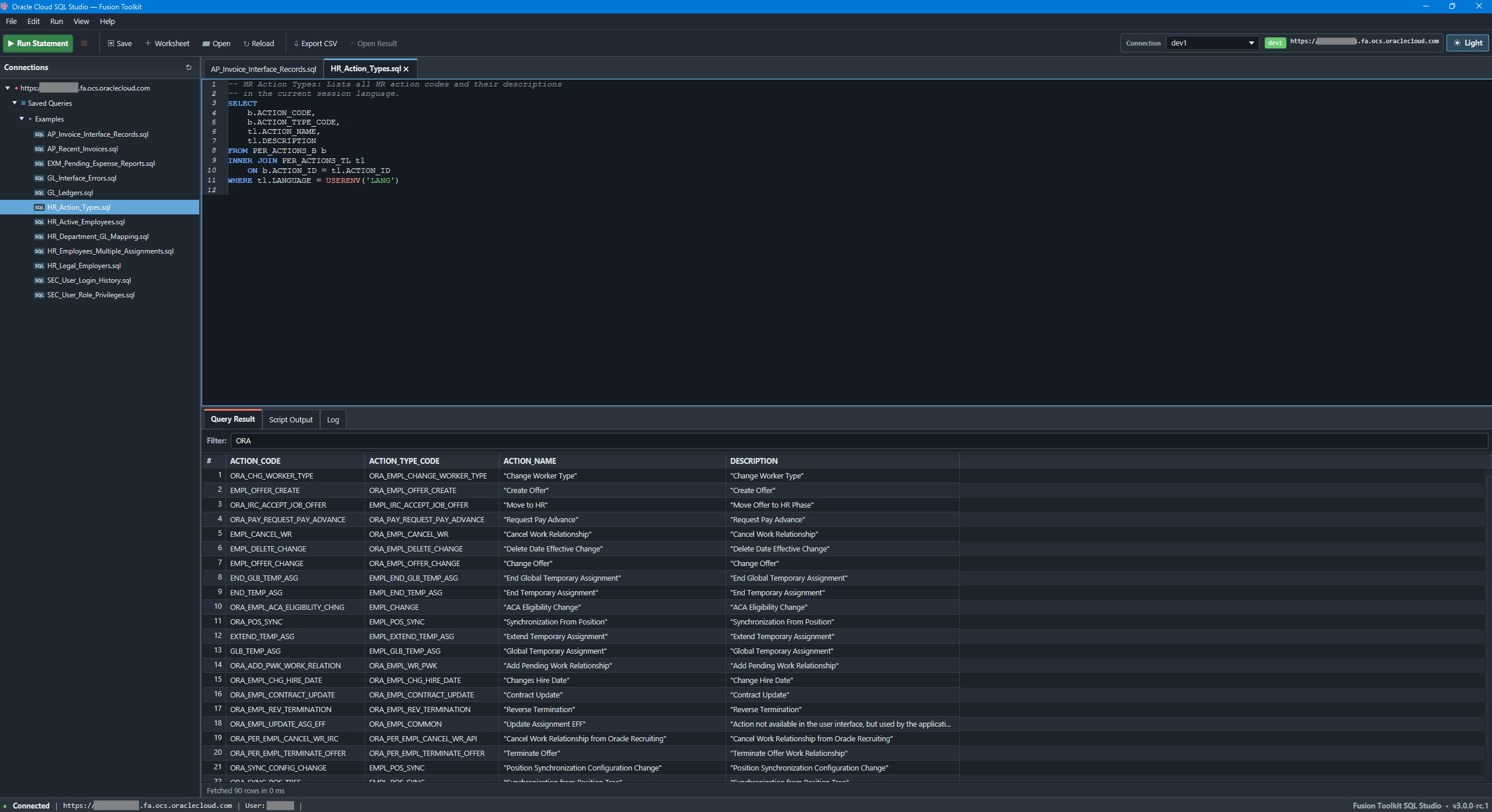
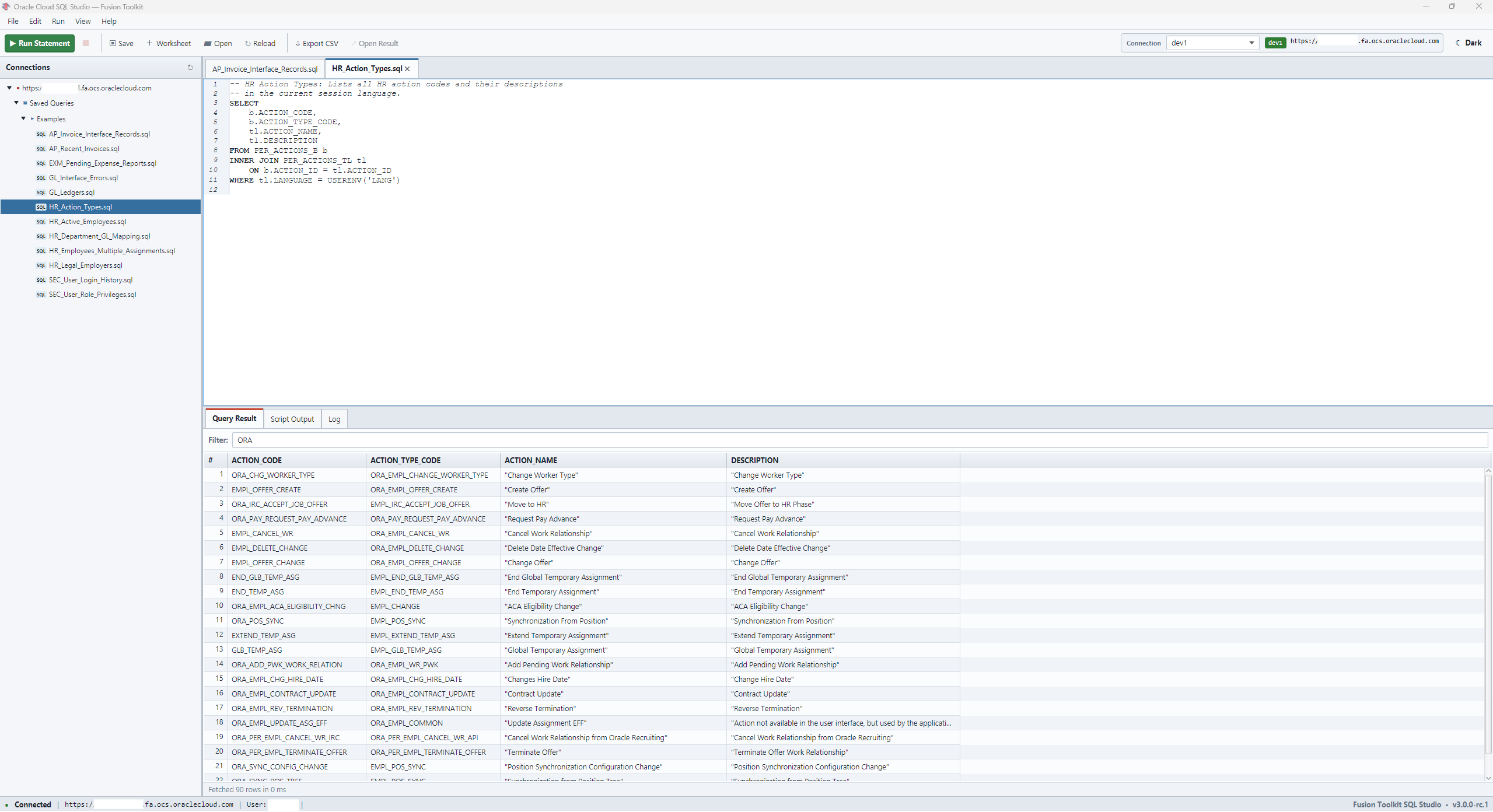
Hello again,
SQL.
The editor you lost, back — against live Cloud ERP. Unzip. Run. No installer. No admin rights.
Windows x64 · OpenJDK 17+
AI AdministratoR
Ask Oracle.
Stay in control.
Ask about your Oracle environment. Get a clear answer. Approve changes only when you are ready.
Included in every plan. Use Codex, Claude, Gemini, or a local Ollama/Qwen agent.
Model accounts and runtime costs remain separate.
Your agent → local Toolkit policy → explicit approval → one Oracle execution → independent verification
Your first query
is an afternoon away.
Register. Activate. Download.
No card. Nothing to cancel. Test it, adopt it.